
PAX Card Machine Setup Guide: Getting Started with Your New Terminal
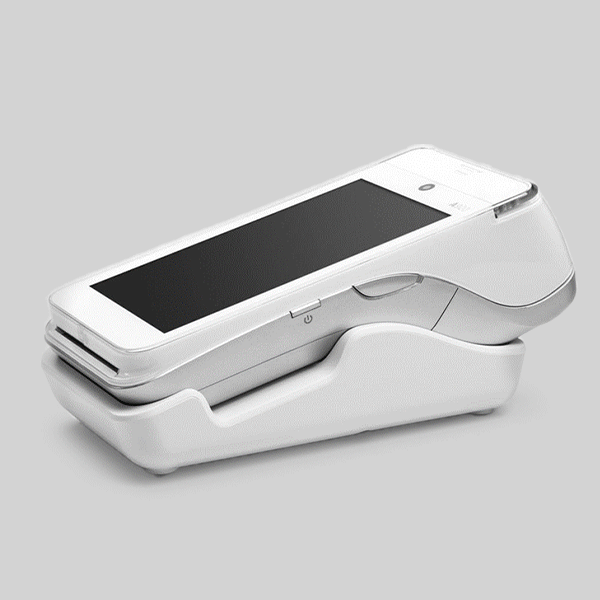
Setting up a new payment terminal can seem daunting, but the PAX card machine Ireland installation process is designed to be straightforward and user-friendly. Whether you’re a small business owner in Dublin receiving your first card terminal or an established retailer in Cork upgrading your payment systems, this comprehensive guide will walk you through every step of the card machine setup Ireland process. At New Payment Innovation, we specialise in payment terminal installation across Ireland and understand the importance of getting your PAX terminal operational quickly and efficiently.
This detailed PAX card machine Ireland setup guide covers everything from initial unboxing to troubleshooting common issues, ensuring your business can start accepting card payments immediately. Our step-by-step approach eliminates guesswork and provides the confidence needed to manage your PAX card machine Ireland terminal effectively.
Understanding Your PAX Card Machine Components
Essential Components in Your PAX Terminal Box
When you receive your PAX card machine Ireland from New Payment Innovation, your package will contain several essential components required for proper installation:
Primary Components:
- PAX payment terminal (model varies: A35, A77, A920, etc.)
- Power adapter and charging cable
- Ethernet cable for wired connectivity
- Paper rolls for receipt printing
- Quick start guide and documentation
- SIM card (for wireless models)
Optional Accessories:
- Protective carrying case
- Additional paper roll supplies
- External pin pad (for specific models)
- Mounting bracket for countertop installation
Documentation Package:
- Installation manual with step-by-step instructions
- User guide for daily operations
- Troubleshooting reference card
- Contact information for technical support
PAX Terminal Model Identification
Different PAX models require specific PAX card machine Ireland setup procedures. Identifying your terminal model ensures you follow the correct installation process for your PAX card machine Ireland device:
PAX A35 Series: Compact handheld terminals ideal for mobile businesses and small retailers. Features built-in printer and card reader with optional wireless connectivity.
PAX A77 Series: Countertop terminals with large displays and integrated printers. Perfect for high-volume retail environments requiring fast transaction processing.
PAX A920 Series: Advanced Android-based terminals with touchscreen displays and comprehensive payment acceptance capabilities including contactless payments.
Step-by-Step PAX Card Machine Setup Process
Initial Preparation and Safety Checks
Before beginning your payment terminal installation, ensure you have a suitable location and necessary utilities:
Location Requirements:
- Stable, level surface near the point of sale
- Access to reliable internet connection (Wi-Fi or Ethernet)
- Proximity to power outlet for terminal charging
- Clear line of sight for customer interaction
- Adequate lighting for screen visibility
Pre-Installation Checklist:
- Verify all components are present and undamaged
- Ensure internet connectivity is stable and tested
- Confirm power outlet functionality
- Prepare merchant account information
- Have contact details for technical support readily available
Physical Terminal Setup
The PAX card machine Ireland physical setup follows a systematic approach ensuring optimal performance for your PAX card machine Ireland terminal:
Step 1: Terminal Positioning Position your PAX terminal on a stable surface where both staff and customers can easily access it. Ensure the screen faces the customer for PIN entry whilst allowing staff to view transaction progress.
Step 2: Power Connection Connect the power adapter to your PAX terminal and plug into a reliable power source. The terminal will display startup screens indicating successful power connection.
Step 3: Paper Roll Installation Open the printer compartment and install the paper roll with the thermal side facing down. Ensure the paper feeds correctly through the printer mechanism.
Step 4: Network Configuration For wired connections, connect the Ethernet cable between your terminal and router. For wireless models, access the settings menu to configure Wi-Fi connectivity.
Network Configuration and Connectivity Setup
Proper network configuration is crucial for reliable card machine setup Ireland performance:
Ethernet Connection Setup:
- Connect Ethernet cable from terminal to your router or network switch
- Navigate to network settings on the terminal display
- Select “Wired Connection” from connectivity options
- Allow the terminal to automatically detect network settings
- Test connectivity by accessing the network status screen
Wi-Fi Configuration Process:
- Access the terminal’s main menu and select “Settings”
- Navigate to “Network” then “Wi-Fi Settings”
- Select your business Wi-Fi network from available options
- Enter the network password using the terminal keypad
- Confirm successful connection through the status indicators
Mobile Data Setup (for 4G models):
- Insert the provided SIM card into the designated slot
- Access “Network Settings” and select “Mobile Data”
- Configure APN settings provided by your network carrier
- Test connectivity and signal strength indicators
Payment Gateway Integration and Configuration
Merchant Account Integration
Connecting your PAX card machine Ireland to your merchant account enables transaction processing:
Configuration Requirements:
- Merchant ID (provided by your payment processor)
- Terminal ID (unique identifier for your device)
- Encryption keys for secure transaction processing
- Gateway configuration parameters
Setup Process:
- Access the “Setup” menu on your PAX terminal
- Select “Merchant Setup” from available options
- Enter your Merchant ID as provided by your payment processor
- Input Terminal ID and confirm accuracy
- Configure encryption settings for secure processing
Testing Payment Processing
Before accepting live transactions, thorough testing ensures your payment terminal installation functions correctly:
Test Transaction Process:
- Perform a test card transaction using a test card
- Verify successful communication with payment gateway
- Confirm receipt printing functionality
- Test contactless payment acceptance (if applicable)
- Validate transaction reporting and settlement
Connectivity Testing:
- Verify stable internet connection during peak usage times
- Test backup connectivity methods (if available)
- Confirm transaction processing speed meets business requirements
- Validate end-of-day settlement procedures
Troubleshooting Common Setup Issues
Network Connectivity Problems
PAX card machine Ireland setup occasionally encounters connectivity challenges. According to PAX Technology, here are solutions for common issues:
Issue: “Network Connection Failed” Error Solution Steps:
- Verify ethernet cable connections are secure
- Restart your router and allow 2-3 minutes for full startup
- Check network settings on the terminal for accuracy
- Contact your internet service provider to verify connection stability
- Test alternative connectivity methods if available
Issue: Intermittent Wi-Fi Disconnections Solutions:
- Position terminal closer to Wi-Fi router for stronger signal
- Check for interference from other wireless devices
- Update Wi-Fi password if recently changed
- Configure static IP address to prevent conflicts
- Consider upgrading to business-grade internet service
Payment Processing Errors
Issue: “Transaction Declined” Messages Troubleshooting Steps:
- Verify merchant account is active and in good standing
- Check terminal configuration matches merchant account settings
- Confirm card reader is clean and functioning properly
- Test with different payment methods to isolate the issue
- Contact New Payment Innovation for technical assistance
Issue: Receipt Printer Not Functioning Solutions:
- Check paper roll installation and paper type compatibility
- Clean printer head with appropriate cleaning solution
- Verify paper roll is loaded with thermal side facing correctly
- Check for paper jams or obstructions in printer mechanism
- Test printer functionality through terminal diagnostics menu
Display and Interface Issues
Issue: Touchscreen Not Responding Resolution Steps:
- Clean screen with appropriate cleaning solution and soft cloth
- Remove any protective film that might interfere with touch sensitivity
- Restart terminal to refresh touchscreen calibration
- Check for physical damage to screen surface
- Access calibration settings to re-calibrate touch sensitivity
Issue: Display Too Dim or Bright Adjustment Process:
- Access “Settings” menu on terminal display
- Navigate to “Display” or “Screen” settings
- Adjust brightness level for optimal visibility
- Test visibility under different lighting conditions
- Save settings and confirm changes take effect
Advanced Configuration and Customisation
Receipt Customisation Options
Personalising your receipts enhances your brand image and provides valuable customer information:
Header Configuration:
- Add your business name and logo
- Include contact information and address
- Insert website and social media details
- Add promotional messages or offers
Footer Customisation:
- Include return policy information
- Add customer service contact details
- Insert loyalty programme information
- Include survey or feedback requests
Security Settings and PCI Compliance
Ensuring your card machine setup Ireland meets security standards protects your business and customers:
Essential Security Configurations:
- Enable automatic screen timeout for unauthorised access prevention
- Configure user access levels and password requirements
- Set up automatic software update schedules
- Enable transaction logging for audit purposes
- Configure secure communication protocols
PCI DSS Compliance Steps:
- Ensure terminal software is updated to latest secure versions
- Implement strong password policies for terminal access
- Configure automatic security updates
- Maintain secure network configurations
- Document security procedures and staff training
Integration with EPOS Systems
Connecting your PAX terminal with existing point-of-sale systems streamlines operations:
Integration Benefits:
- Automatic transaction recording in sales systems
- Real-time inventory updates based on sales
- Simplified end-of-day reporting and reconciliation
- Enhanced customer experience through unified systems
Setup Process:
- Identify your EPOS system’s payment integration capabilities
- Configure terminal communication settings for EPOS compatibility
- Test transaction flow between systems
- Verify data accuracy and synchronisation
- Train staff on integrated system operation
Maintenance and Ongoing Support
Daily Maintenance Procedures
Regular maintenance ensures optimal PAX card machine Ireland performance according to Card Payment Industry best practices:
Daily Tasks:
- Clean terminal screen and keypad with appropriate cleaning solution
- Check paper roll levels and replace when necessary
- Verify network connectivity and signal strength
- Review transaction logs for any processing errors
- Ensure terminal remains securely positioned
Weekly Maintenance:
- Deep clean printer mechanism and card reader slot
- Check power cable connections for security
- Review and clear transaction logs as appropriate
- Test backup power solutions (if applicable)
- Verify security settings remain configured correctly
Software Updates and Security Patches
Keeping your terminal software current ensures security and functionality:
Automatic Update Configuration:
- Access “Settings” menu and navigate to “Software Updates”
- Enable automatic update downloads during off-peak hours
- Configure notification settings for available updates
- Set restart schedules that minimise business disruption
- Maintain backup procedures before major updates
Manual Update Process:
- Check for available updates through terminal menu
- Download updates during low-traffic periods
- Follow on-screen instructions for update installation
- Verify terminal functionality after update completion
- Document update history for compliance records
When to Contact Technical Support
Recognising when professional assistance is needed prevents extended downtime:
Contact Support For:
- Persistent network connectivity issues
- Payment processing errors affecting multiple transactions
- Hardware malfunctions or physical damage
- Security-related concerns or suspicious activity
- Complex integration requirements with existing systems
Support Contact Information: For technical assistance with your payment terminal installation, contact New Payment Innovation at 01-4475299. Our certified technicians provide comprehensive support for all PAX terminal models and configurations.
Optimising Transaction Performance
Speed Enhancement Techniques
Maximising transaction speed improves customer satisfaction and operational efficiency:
Network Optimisation:
- Use wired Ethernet connections for fastest processing
- Ensure adequate internet bandwidth for peak transaction volumes
- Configure Quality of Service (QoS) settings to prioritise payment traffic
- Position wireless terminals close to access points for optimal signal
Terminal Configuration:
- Disable unnecessary features that slow transaction processing
- Optimise receipt settings to print essential information only
- Configure automatic settlement schedules during off-peak hours
- Enable contactless payments for faster customer transactions
Customer Experience Enhancement
Improving the payment experience encourages customer satisfaction and repeat business:
Interface Optimisation:
- Configure clear, simple payment prompts
- Set appropriate timeout periods for customer interaction
- Customise screen messages with helpful instructions
- Enable multiple language support for diverse customer base
Receipt Management:
- Offer email receipt options to reduce paper usage
- Configure mobile phone receipt delivery via SMS
- Provide digital loyalty programme integration
- Include QR codes for customer feedback or promotions
Compliance and Regulatory Considerations
Irish Payment Industry Regulations
Understanding local compliance requirements ensures your PAX card machine Ireland setup meets regulatory standards according to the Central Bank of Ireland:
Central Bank of Ireland Requirements:
- Compliance with Payment Services Directive (PSD2)
- Strong Customer Authentication (SCA) implementation
- Transaction monitoring and reporting obligations
- Consumer protection compliance measures
Data Protection Obligations:
- GDPR compliance for customer data handling
- Secure storage and transmission of payment information
- Customer consent management for data processing
- Right to erasure implementation for customer requests
Industry Standards Compliance
Meeting international standards ensures broad payment acceptance and security. The PCI Security Standards Councilprovides comprehensive guidelines for PAX card machine Ireland compliance:
EMV Compliance:
- Chip and PIN transaction processing capability
- Contactless payment acceptance for convenience
- Fallback procedures for magnetic stripe cards
- Terminal certification for payment brand acceptance
PCI DSS Requirements:
- Secure payment application implementation
- Network security configuration and monitoring
- Regular security testing and vulnerability assessments
- Staff training on security procedures and protocols
Future-Proofing Your Payment Setup
Emerging Payment Technologies
Preparing for future payment methods ensures long-term PAX card machine Ireland terminal viability. Visa reports increasing adoption of digital payment methods:
Digital Wallet Integration:
- Apple Pay and Google Pay acceptance capability
- Cryptocurrency payment processing options
- Buy-now-pay-later service integration
- Loyalty programme and rewards management
Biometric Authentication:
- Fingerprint verification for enhanced security
- Facial recognition for streamlined authentication
- Voice recognition for accessibility improvements
- Multi-factor authentication implementation
Scalability Considerations
Planning for business growth ensures your PAX card machine Ireland setup adapts to changing needs:
Multi-Location Management:
- Centralised reporting and management capabilities
- Uniform configuration across multiple terminals
- Remote monitoring and troubleshooting access
- Consolidated settlement and reporting systems
Integration Expansion:
- API connectivity for custom application development
- Third-party service integration capabilities
- Advanced analytics and reporting tools
- Mobile device integration for enhanced functionality
Conclusion: Achieving Payment Terminal Excellence
Successfully setting up your PAX card machine Ireland creates the foundation for efficient, secure payment processing that enhances customer experience and supports business growth. This comprehensive PAX card machine Ireland setup guide provides the knowledge and procedures necessary to achieve optimal PAX card machine Ireland terminal performance whilst avoiding common pitfalls and configuration errors.
The payment terminal installation process, whilst detailed, becomes straightforward when approached systematically with proper preparation and understanding. From initial unboxing through advanced configuration, each step contributes to creating a robust payment processing solution that serves your business reliably for years to come.
At New Payment Innovation, we understand that proper terminal setup is just the beginning of a successful payment processing relationship. Our commitment to comprehensive support ensures your PAX terminal continues operating at peak performance whilst adapting to evolving business needs and industry requirements.
The investment in thorough setup procedures pays dividends through reduced downtime, enhanced security, improved customer satisfaction, and seamless daily operations. Whether you’re processing your first transaction or handling thousands daily, the foundation established through proper PAX card machine Ireland configuration ensures consistent, reliable performance.
For ongoing support, advanced configuration assistance, or questions about optimising your payment terminal performance, contact New Payment Innovation at 01-4475299 or visit www.npi.ie. Our certified technicians provide expert guidance for all aspects of card machine setup Ireland and payment terminal installation, ensuring your business maintains competitive advantages through superior payment processing capabilities.
New Payment Innovation provides comprehensive PAX terminal setup, installation, and support services throughout Ireland. Guaranteed Irish expertise for reliable payment processing solutions that grow with your business.